When I first started talking to electricians and homeowners about extending ceiling device remotes, most of them thought it meant buying a longer battery or taping the remote to a stick. As an RF remote supplier, I’ve heard that a thousand times, and I get it—ceiling fans, lights, and smart thermostats mounted 8+ feet high feel impossible to reach sometimes. But here’s the thing: extending an RF remote isn’t about making the remote longer. It’s about working with how RF signals work, not against them. RF Remote
Let’s start with the basics, because so many people skip this step and mess everything up. RF stands for radio frequency, and unlike IR (infrared) remotes that need a straight line of sight, RF signals can go through drywall, wood, and even thin metal pipes. That’s why your ceiling fan remote works through a closed attic hatch, right? But ceiling devices are often mounted where their built-in RF receivers are blocked by insulation, metal ductwork, or multiple layers of ceiling joists. The remote’s signal can’t reach up 10 feet to the receiver, so you have to amplify or re-route that signal.
I want to break down the methods we’ve tested and supplied for years, each for a different scenario. Whether you’re a homeowner with a 12-foot vaulted ceiling, an electrician wiring a new addition, or someone who just rearranged their living room and lost remote control range, there’s a solution that doesn’t involve buying a brand-new ceiling fan.
First, let’s talk about simple signal boost solutions for short range issues. A lot of people don’t realize that most stock RF ceiling remotes have a tiny antenna built right into the remote. If you hold the remote wrong, or if there’s something blocking the antenna, range drops. We sell simple 2.4GHz or 433MHz external antenna extensions that screw right into the back of most of our compatible remotes. They’re just 6 inches to 2 feet long, flexible, and don’t require any tools. Last month, a customer in Dallas emailed us saying he had a 10-foot ceiling and his remote only worked if he stood directly under the fan. He attached a 1-foot antenna extension to his remote, and now he can control the fan from his kitchen 15 feet away. The key here is matching the frequency of your existing remote—most ceiling devices use 433MHz, but some newer smart models use 2.4GHz. If you get the wrong frequency, the extension won’t work. That’s why we always tell customers to check the label on their old remote first.
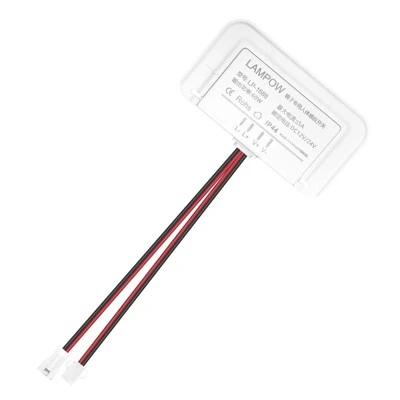
But what if the receiver on the ceiling device is the problem? The built-in receiver is almost always tucked inside the fan’s motor housing or the light fixture, where it’s surrounded by metal. A more permanent fix for that is an external RF receiver module. These are small, plastic box units—about the size of a matchbox—that mount under the ceiling device, right on the ceiling drywall or the fan’s downrod. They pick up RF signals better than the built-in receiver because they’re not blocked by metal, and they have a 10-foot cable connecting them to the original device. So instead of wiring the receiver inside the fan, you run that 10-foot cable down the downrod and connect it to the fan’s control board. That way, the receiver is sitting in open air, no insulation around it, so signals from the remote can reach it from anywhere in the room. We supply these receivers in two types: plug-and-play for homeowners who don’t want to mess with wiring, and hardwired for electricians working on new construction. I recently worked with an electrician in Chicago who was installing ceiling fans in a basement with metal I-beams every 2 feet. The built-in receivers couldn’t get a signal at all, even when holding the remote directly under the fan. We sent him 12 of our hardwired external receivers, and he told me last week that every single one worked perfectly, with range up to 30 feet from the remote.
If you have even bigger range issues—like a two-story house, or a ceiling device in a closed attic—then you need an RF signal repeater. Repeaters are a step up from external receivers. They pick up a weak RF signal, amplify it, and rebroadcast it, so it can travel farther. Some repeaters work as a middleman between your remote and the ceiling receiver, and they’re perfect for large rooms or spaces where walls block signals. We’ve seen customers use repeaters to control ceiling fans on the second floor from the first floor, or to control a fan in a guest room all the way from the master bedroom. One thing to note with repeaters: they need to be placed where they can pick up the original remote’s signal, and where they can send that amplified signal to the ceiling receiver. They don’t work if you just place them anywhere—they’re not magic. We include a setup guide with every repeater that tells you to test the signal at different spots, usually 10 to 15 feet from the device, before mounting it.
Now, let’s get into the permanent installation methods, because a lot of people don’t want to mess around with external antennas or repeaters on their wall. If you’re wiring a new ceiling fan or light, you can run a pre-wired RF remote system during construction. That’s the most reliable way to extend an RF remote, because you control the receiver’s location from the start. Instead of buying a standard ceiling device with a built-in receiver, you can order a receiver module that’s designed to mount in the ceiling wall or even in the attic, near the power source, and run wires to the fan or light fixture. That way, the receiver is in an open space, no obstructions, so the remote’s signal can reach it from any point in the room. I can’t tell you how many new construction projects we’ve supplied these for. A general contractor in Houston told me that using pre-wired remote systems cut his installation time in half because he doesn’t have to fish wires through the fan downrod, and homeowners love that they don’t have to point the remote at the fan.
There’s also a less common method that’s great for retrofits: extending the remote’s signal line. Wait, no—when people say that, they usually mean running a wire from the original remote’s location to the ceiling, but that’s not right. The actual method is called RF over Ethernet, or using a coaxial cable to extend the RF signal. You take your original remote, mount it in a convenient spot on the wall, connect it to a coaxial cable that runs up through the wall to the ceiling, and the other end of the cable connects to a transmitter near the ceiling receiver. The transmitter sends the RF signal through the cable, so it reaches the ceiling device no matter where you mount the remote. This is perfect for homes where you have a ceiling device and want to control it from a single wall spot, especially if you’re replacing a pull-chain light with a remote-controlled one. We’ve had architects use this method for large open-concept homes where they want a central remote station for all ceiling devices in the main living area.
Now, I want to talk about common mistakes we see all the time, because even with the right parts, people mess up the setup. First, using the wrong frequency. 433MHz is the most common for standard ceiling devices, but a lot of newer smart devices use 2.4GHz, and some even use 315MHz. If your remote says 433 on the label, don’t buy a 2.4GHz antenna extension—it won’t work. Second, not testing before mounting. We’ve had customers mount repeaters or external receivers in the attic, only to realize that their remote’s signal doesn’t reach that spot, so they have to take it all down and move it. Always test the signal from the spot you want to mount the receiver first, with the remote, to make sure it works. Third, ignoring interference. RF signals can be blocked by metal, but they can also be interfered with by other devices: baby monitors, Wi-Fi routers, garage door openers. If your remote works sometimes and not others, try moving your Wi-Fi router away from the ceiling receiver, or change the channel on the receiver (most of our receivers are multi-channel, so you can switch between 10 different frequencies to avoid interference).
Last year, I got a call from a customer in Denver who had a vaulted ceiling in his living room, 14 feet high, and his remote only worked if he climbed a ladder and held it up to the fan. He’d tried taping his remote to a pool skimmer and holding it over his head, but that was annoying and didn’t last. We recommended two things: a 2-foot external antenna for his existing remote, and a small external receiver to mount on the ceiling’s crown molding, right where the signal was least blocked. He installed it himself, and told me a week later that he could control the fan from his backyard, 20 feet away. That’s the kind of solution we love: simple, affordable, and works.
I know a lot of people think extending an RF remote is complicated, but it doesn’t have to be. It’s about matching the right solution to your specific problem: short range? Get an antenna. Built-in receiver blocked? Get an external receiver. Large space? Get a repeater. New construction? Pre-wire the system. The key is knowing how RF signals work, and working with the obstructions instead of fighting them.
If you’re dealing with a ceiling remote that won’t reach, or you’re planning a project that needs extended RF control for ceiling devices, we can help. Our team has worked with electricians, contractors, and homeowners across the country, and we can recommend the exact parts you need, whether it’s a simple antenna or a full repeater system. We don’t sell one-size-fits-all solutions—we work with you to figure out what will work for your space.

If you’re ready to talk about your specific needs, reach out to our team to discuss your requirements and get a customized quote. We’re here to answer your questions, no matter how small.
Wireless Sensor Switch References
- Federal Communications Commission. (2022). RF Signal Propagation for Consumer Radio Devices. Retrieved from industry technical guidelines for consumer electronics suppliers
- National Electrical Manufacturers Association. (2021). Standards for Remote Control Systems for Residential Ceiling Appliances. NEMA Publication No. RC-2021
- RF Signal Solutions Technical Manual. (2023). External Receivers and Antenna Extensions for Residential RF Systems. Manufacturer’s Application Guide for Consumer Electronics Installations
Dongguan Lanbaoli Intelligent Technology Co., Ltd.
As one of the most professional rf remote manufacturers and suppliers in China, our products have good reputation in the market. We warmly welcome you to buy durable rf remote for sale here and get pricelist from our factory. Quality products and low price are available.
Address: 10th Floor, Building 32, Golden Town, No.7 Technology Avenue, Houjie Town, Dongguan City, Guangdong Province
E-mail: anna@lampow.cn
WebSite: https://www.lblsensors.com/
